View Categories

▶️ How to Start Cloud Plan

Try the full BlackVue Cloud experience for free with a 1-month trial!

🎁 What is the 1-Month Free Trial? #

The 1-Month Free Trial allows new users to try BlackVue Cloud services for 30 days at no cost.
You can select between:

  • Lite Plan
  • Smart Plan

Enjoy all features included in the selected plan during your trial period.

⚠️ Note: This offer is only available to users who have never subscribed before.

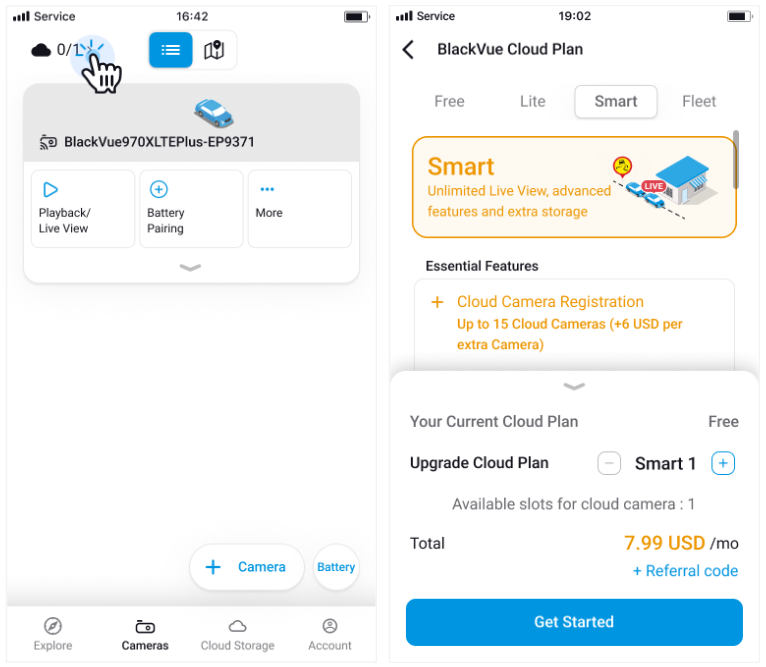
From Cameras Tab #

  • Tap the Cloud icon in the top left corner.
  • Swipe to browse Cloud Plans.
  • To add more cameras, tap the ‘+’ button (up to 15 cameras).
  • Once ready, tap ‘Get Started’ or ‘Change’.

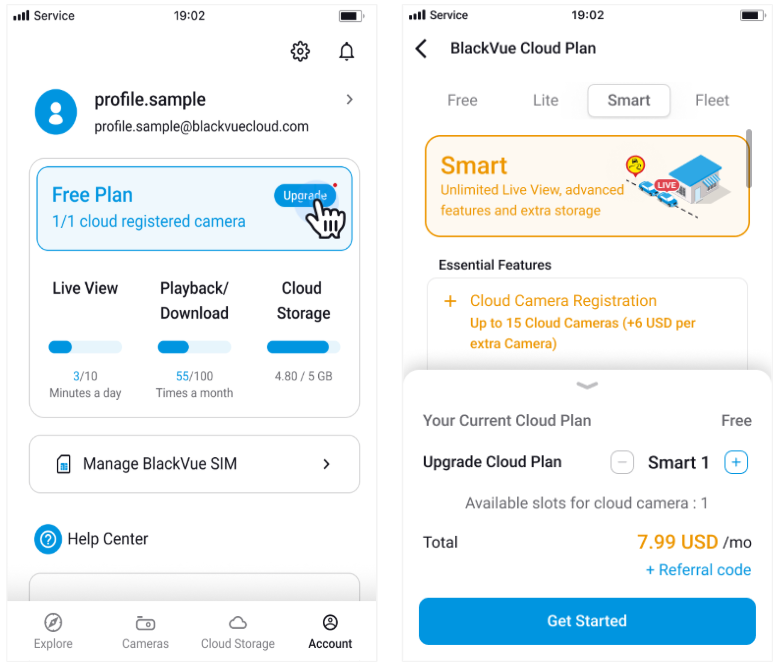
From Account Tab #

  • Tap the Upgrade button to view recommended Cloud Plans.
  • Swipe to browse available plans.
  • Tap the ‘+’ button to add cameras (up to 15 cameras).
  • Select your plan and tap ‘Get Started’ or ‘Change’.

💡 Tip: You can manage or upgrade your Cloud Plan anytime from the Account tab.

Powered by BetterDocs