Skip to content
Main Menu
HOMEPAGE
DASHCAMS
Software
Menu Toggle
BlackVue
FLEETA
SHOP
CONTACT
All Categories
Getting Started Guide
Getting Started(App)
Camera Registration & Management
BlackVue Cloud Features
Cloud Storage
Account Management
Camera Notifications(App)
Accessories : SIM & Battery
Getting Started
Dashcam Configuration
Features
Member & Group Management
Popular Search
download
how to
wifi
time
delete
View Categories
Home
Docs
BlackVue Renewal
BlackVue Cloud Features
🔄 How to Change Cloud Connection Settings
🔄 How to Change Cloud Connection Settings
Listen
0:00
/
0:09
1×
Copy page
Copy page
Copy this page as Markdown for LLMs
View as Markdown
Open this page as plain Markdown
(opens in a new tab)
Open in ChatGPT
Ask questions about this page
(opens in a new tab)
Open in Claude
Ask questions about this page
(opens in a new tab)
Open in Google AI Studio
Ask questions about this page (Google account required)
(opens in a new tab)
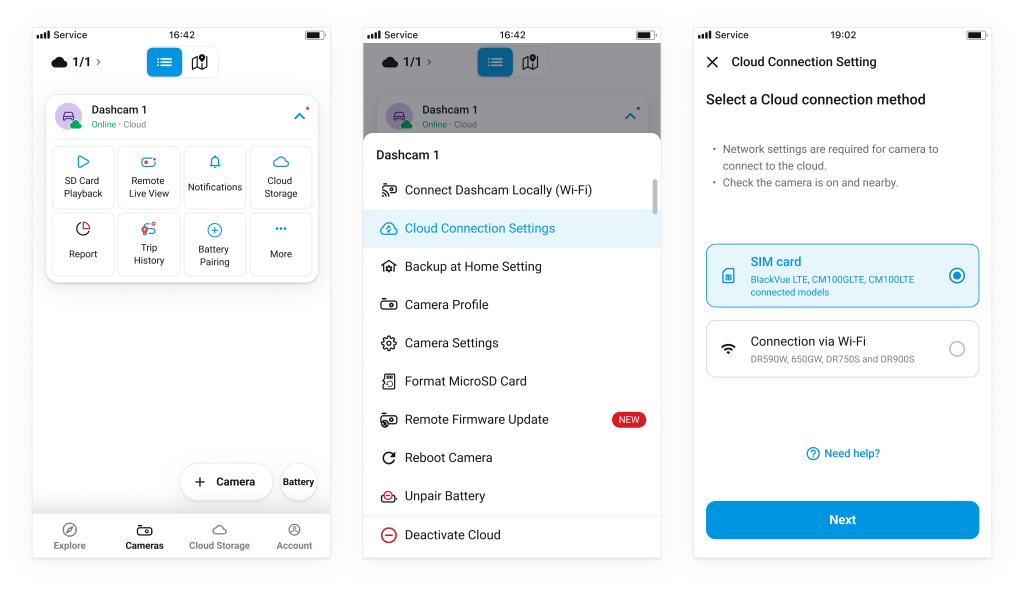
To update the internet settings for your Cloud camera:
Tap
“More (⋮)”
next to the camera.
Select
“Cloud Connection Settings.”
Choose your new connection method and apply the settings.
Powered by
BetterDocs