View Categories

🛠️ FOTA(Firmware Over-The-Air) Update

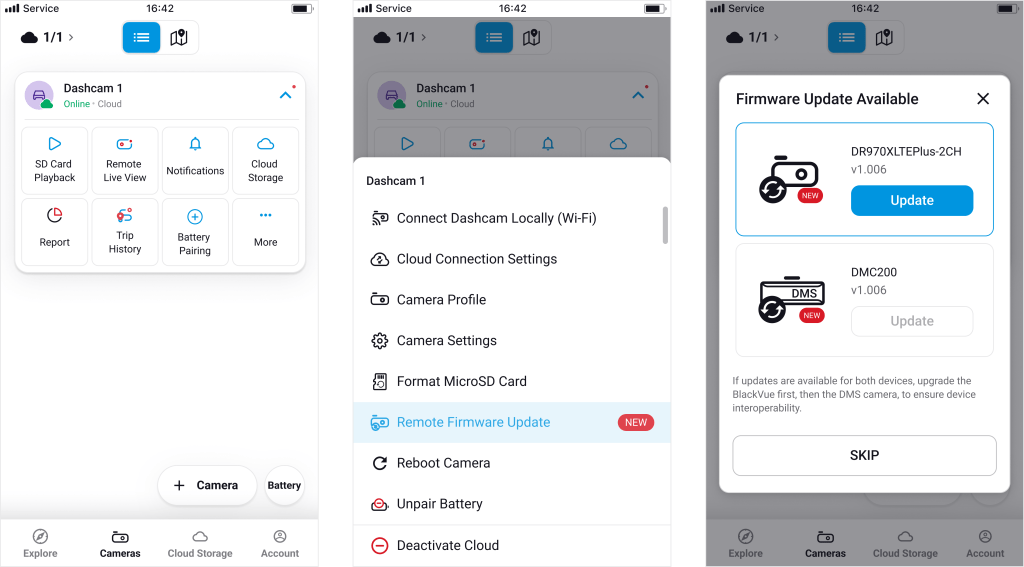
BlackVue supports wireless firmware updates (FOTA) for cameras connected via Wi-Fi.

🛜FOTA (Firmware Over The Air)
#

With  FOTA using Wi-Fi, you can check if a new firmware version is available.

🔧How to use FOTA #

  1. Tap the Remote Firmware Update  menu.
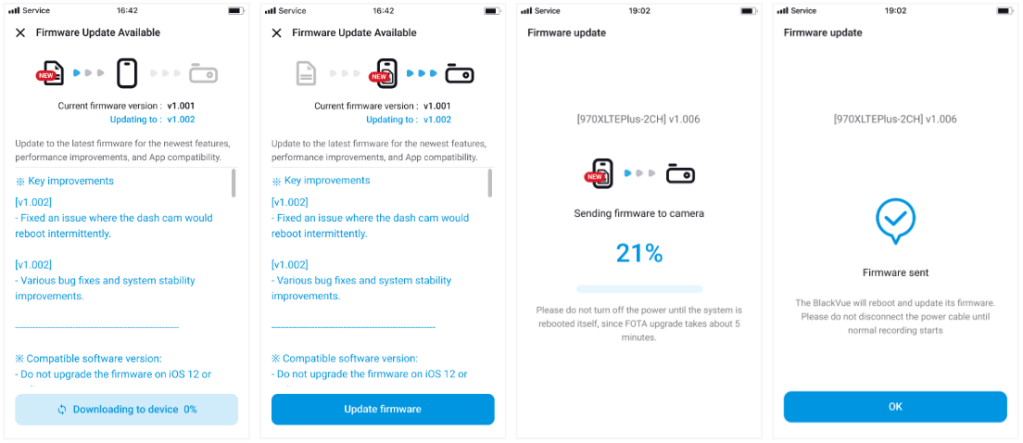
  2. If a new firmware is available, it will be automatically downloaded to the app.
  3. Check the update details in the Release Notes.
  4. Tap the “Update Firmware” button to start the update.
  5. The firmware will be wirelessly sent from the app to the dashcam.
  6. Once the update is complete, a confirmation screen will appear.

DMC200 FOTA #

The DMC200 is an AI-powered infrared (IR) camera connected to the front camera.
It has its own firmware and supports both FOTA using Wi-Fi and FOTA using Cloud.

How to update DMC200 firmware:

  1. Go to the settings of the camera connected to the DMC200.
  2. Download the DMC200 firmware update.

⚠️ Important:
When updating both the front camera and the DMC200, always update the front camera firmware first.

Powered by BetterDocs