Skip to content
Main Menu
HOMEPAGE
DASHCAMS
Software
Menu Toggle
BlackVue
FLEETA
SHOP
CONTACT
All Categories
Getting Started(App)
Getting Started Guide
Camera Registration & Management
BlackVue Cloud Features
Cloud Storage
Account Management
Camera Notifications(App)
Accessories : SIM & Battery
Getting Started
Dashcam Configuration
Features
Member & Group Management
Popular Search
download
how to
wifi
time
delete
View Categories
Home
Docs
BlackVue Renewal
Cloud Storage
📊 How to Check Cloud Storage Usage and switch to another Cloud Storage
📊 How to Check Cloud Storage Usage and switch to another Cloud Storage
Table of Contents
✅Check Cloud Storage Usage
🔄Switch to Another Camera’s Cloud Storage
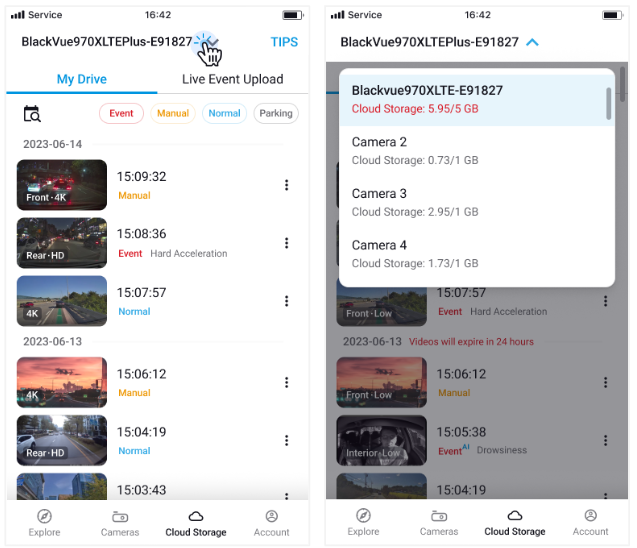
✅Check Cloud Storage Usage
#
Tap the
camera name
at the top.
A list of your cameras will be displayed.
Cloud storage usage
for each camera appears below the camera name.
🔄Switch to Another Camera’s Cloud Storage
#
Tap the
camera name
to switch and check another camera’s
Cloud Storage
.
Powered by
BetterDocs