Skip to content
Main Menu
HOMEPAGE
DASHCAMS
Software
Menu Toggle
BlackVue
FLEETA
SHOP
CONTACT
All Categories
Getting Started Guide
Getting Started(App)
Camera Registration & Management
BlackVue Cloud Features
Cloud Storage
Account Management
Camera Notifications(App)
Accessories : SIM & Battery
Getting Started
Dashcam Configuration
Features
Member & Group Management
Popular Search
download
how to
wifi
time
delete
View Categories
Home
Docs
BlackVue Renewal
BlackVue Cloud Features
🚫How to deactivate a Cloud Camera
🚫How to deactivate a Cloud Camera
Listen
0:00
/
0:17
1×
Copy page
Copy page
Copy this page as Markdown for LLMs
View as Markdown
Open this page as plain Markdown
(opens in a new tab)
Open in ChatGPT
Ask questions about this page
(opens in a new tab)
Open in Claude
Ask questions about this page
(opens in a new tab)
Open in Google AI Studio
Ask questions about this page (Google account required)
(opens in a new tab)
Table of Contents
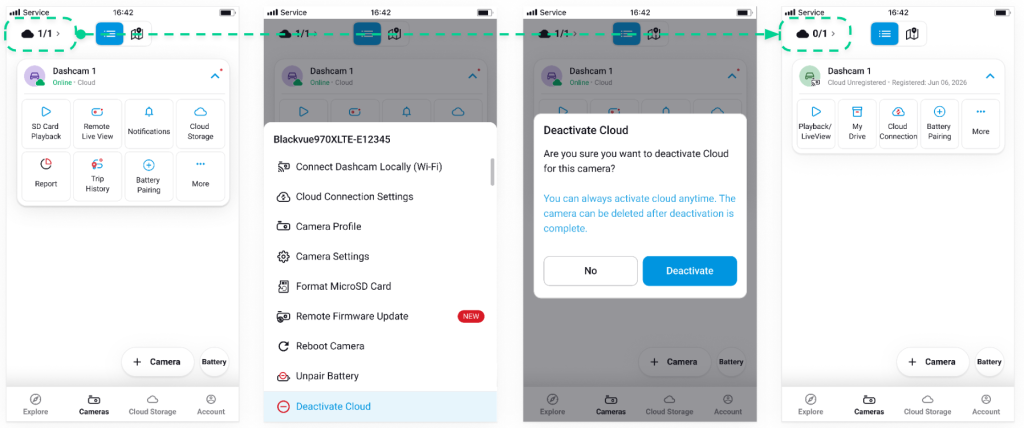
🔧 To deactivate a cloud camera
Deactivating a camera from the cloud will
switch it to normal camera
.
🔧 To deactivate a cloud camera
#
Tap the
“More” (⋮)
button next to the cloud camera.
Tap
“Deactivate Cloud.”
Read the confirmation pop-up and tap
“Deactivate”
to confirm.
The cloud camera will now appear as a
normal
camera
in your list.
Powered by
BetterDocs